On this page
Audience & goalsLesson 1 — Collecting a diagnostic fee to a treasuryLesson 2 — Reading "Pulses / Sessions" on operationsLesson 3 — Taking a payment on a stepped operationQuick knowledge checkTrainer notesFor Training
Use this to teach staff what changed and to verify it in a session. The workflows do not change — the point of training is to build confidence that the money now records correctly and to retire old workarounds.
Audience & goals
- Receptionists / front desk — collect diagnostic fees to the right treasury.
- Doctors / clinicians — trust that commission on stepped treatments is
counted in full.
- Accountants / managers — reconcile treasuries and payments cleanly.
Lesson 1 — Collecting a diagnostic fee to a treasury
Concept: a treasury is where collected money sits (a cash drawer or bank account). When you collect the exam fee at booking, you must attach it to a treasury.
Do it (mobile):
- Calendar → New Appointment.
- Fill patient, doctor, room, time, type (see screenshot below).
- Scroll to Diagnostic Fees → choose Collected.
- Enter the amount, confirm the payment method (Cash), and pick the
Treasury.
- Confirm the treasury you tapped stays shown in the field. (This is the
behavior the fix guarantees — previously it could blank out.)
- Save. An invoice is created automatically for that fee.
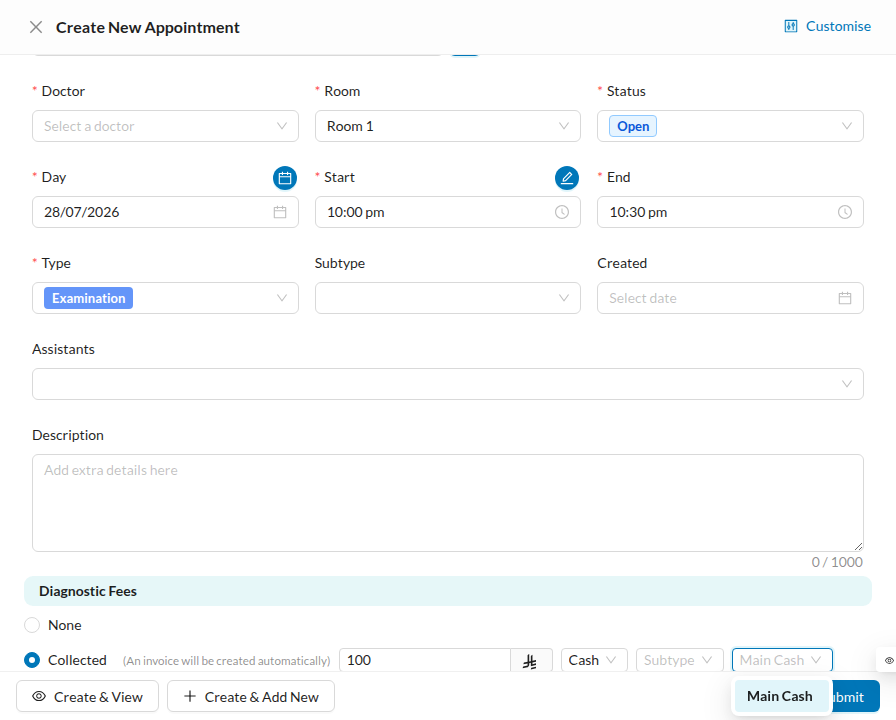
Teach the retirement of the workaround: staff who learned to "just leave the default treasury because changing it breaks the field" should now change it freely.
Lesson 2 — Reading "Pulses / Sessions" on operations
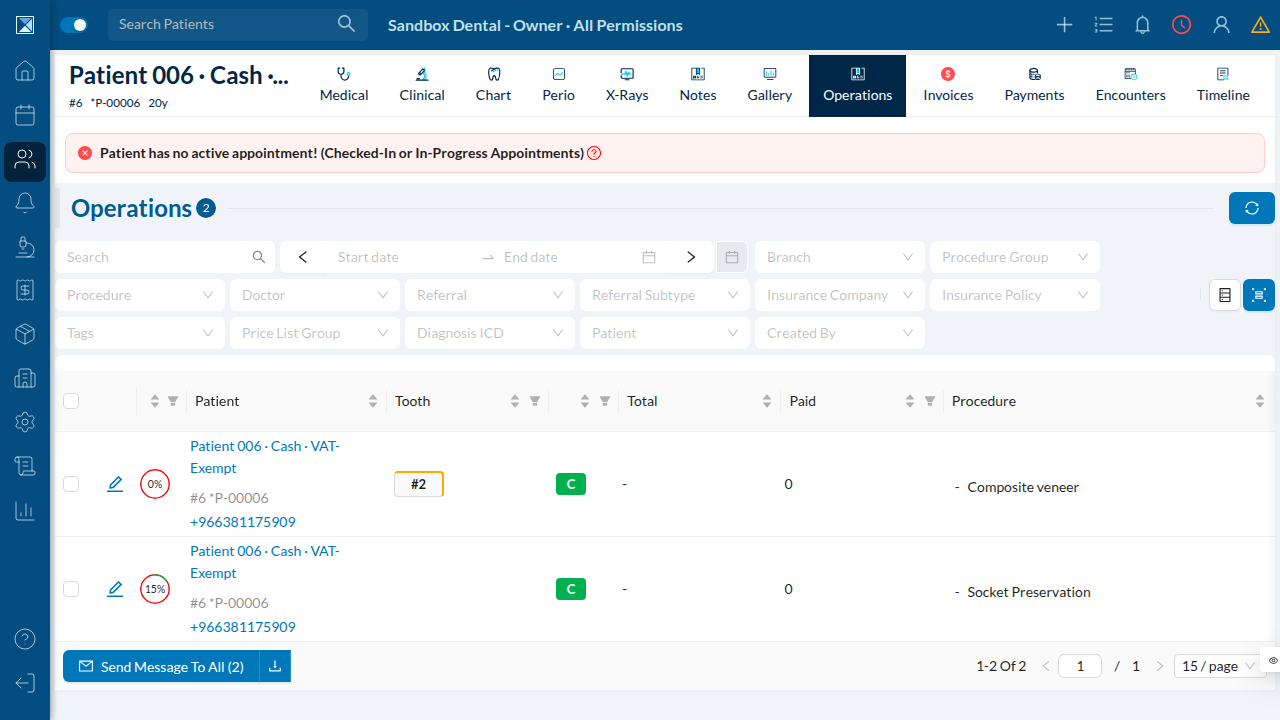
Concept: a treatment done over several visits is an operation with steps. Dentolize shows the remaining steps as "Pulses / Sessions" on the patient's Operations tab.
Do it:
- Open a patient → Operations.
- Find the Remaining Pulses / Sessions column.
- Point out that each remaining pulse is a session that can be completed and
paid over time.
Lesson 3 — Taking a payment on a stepped operation
Do it:
- From the dashboard or an invoice, click Add Payment.
- Enter the amount, date, and Treasury.
- Apply it.
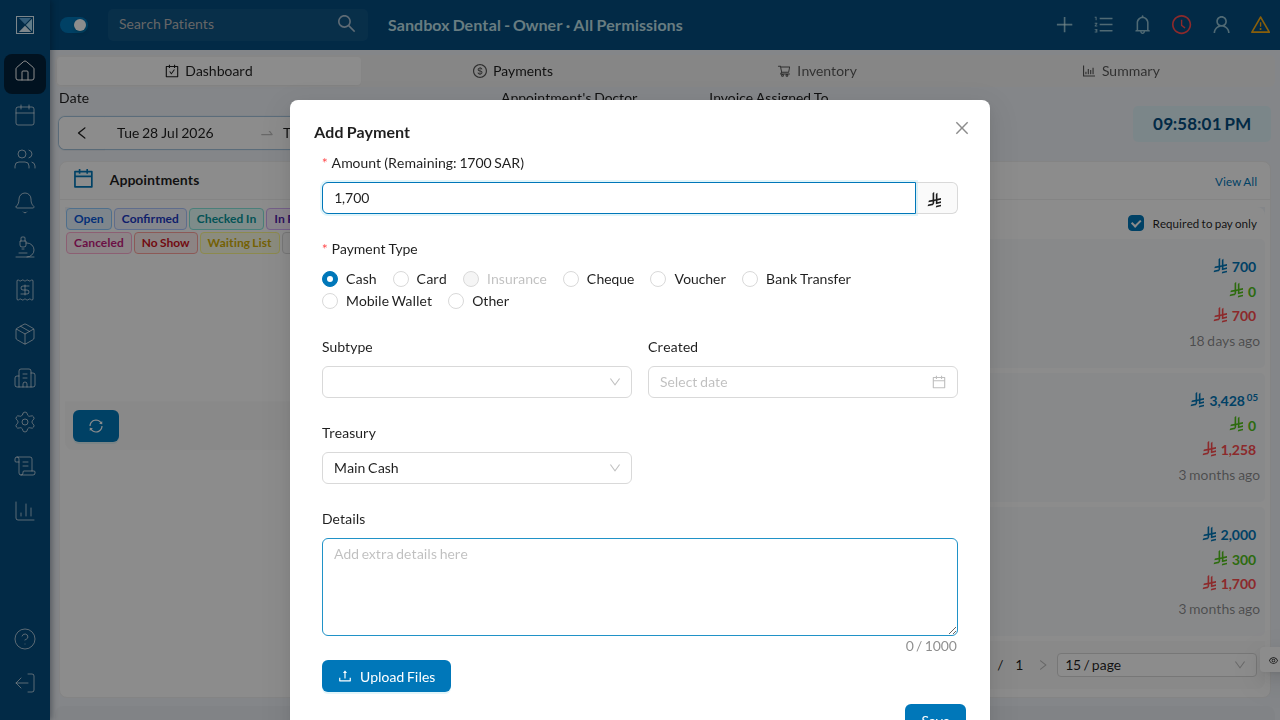
Teach the expected result:
- The payment records as one entry (not split).
- If it clears the balance, the operation and its steps show Paid in Full.
- The doctor's commission for that collection is recorded in full.
Quick knowledge check
- What is a treasury, and when do you choose one at booking?
(Where collected money sits; when you set the diagnostic fee to Collected.)
- What does "Remaining Pulses / Sessions" mean?
(The steps of a multi-visit treatment still to be done/paid.)
- After paying off a stepped operation, what should its status read?
(Paid in Full, on the operation and its steps.)
Trainer notes
- The treasury display fix is mobile; if you train on web, the treasury
field already showed the value — focus the treasury lesson on mobile.
- Payments recorded before the fix are not auto-corrected; don't teach staff
to expect old records to change.