Automation Engine
Business view
The Automation Engine removes the manual busywork of lead follow-up. A clinic builds simple rules that read as **"when this happens, if these conditions hold, do these things."**
- When (trigger): a lead is created; a lead moves to a new stage; a lead goes stale
(sits too long in a stage).
- If (conditions, optional): the lead's source, platform, current stage, or referral
source matches. Up to 10 conditions, combined with equals / is-one-of.
- Do (actions): assign the lead to a user, add a tag, move it to a stage, or send an
approved WhatsApp template — in order, up to 10 actions.
Every rule keeps a run history so staff can see exactly when it fired, on which lead, and whether each run succeeded, was skipped, or failed. Rules can be toggled on/off without deleting them.
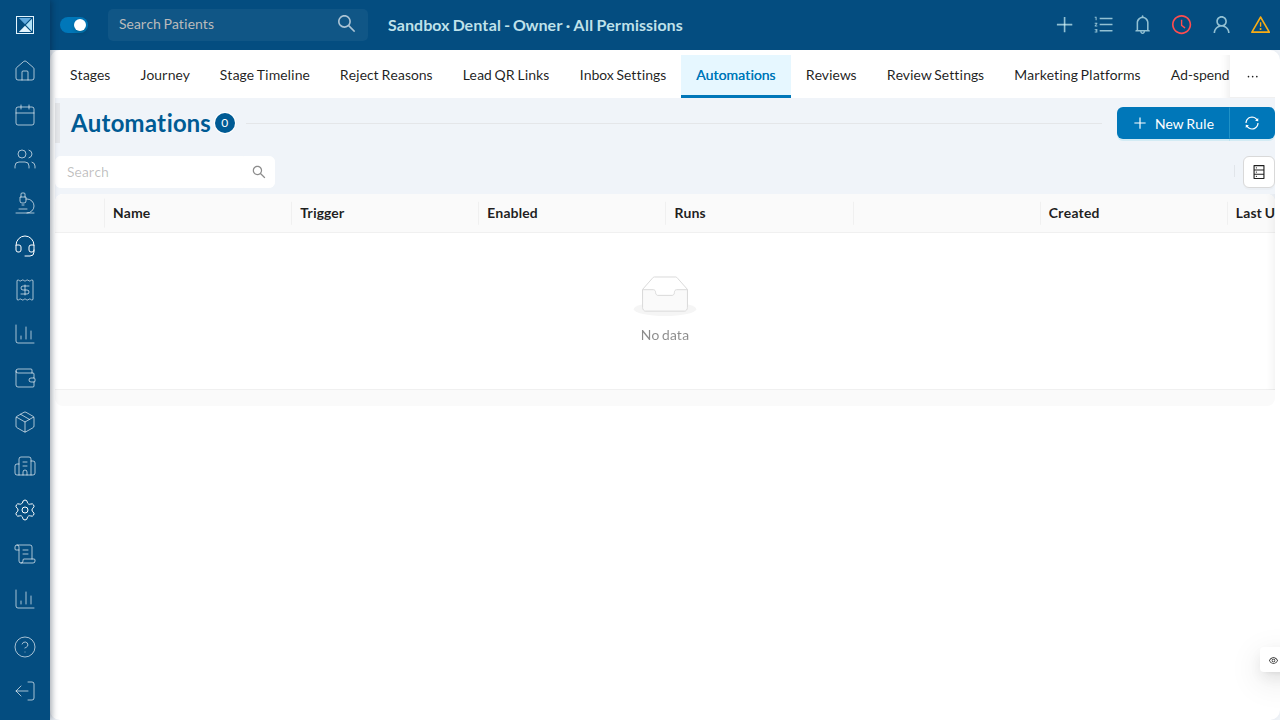
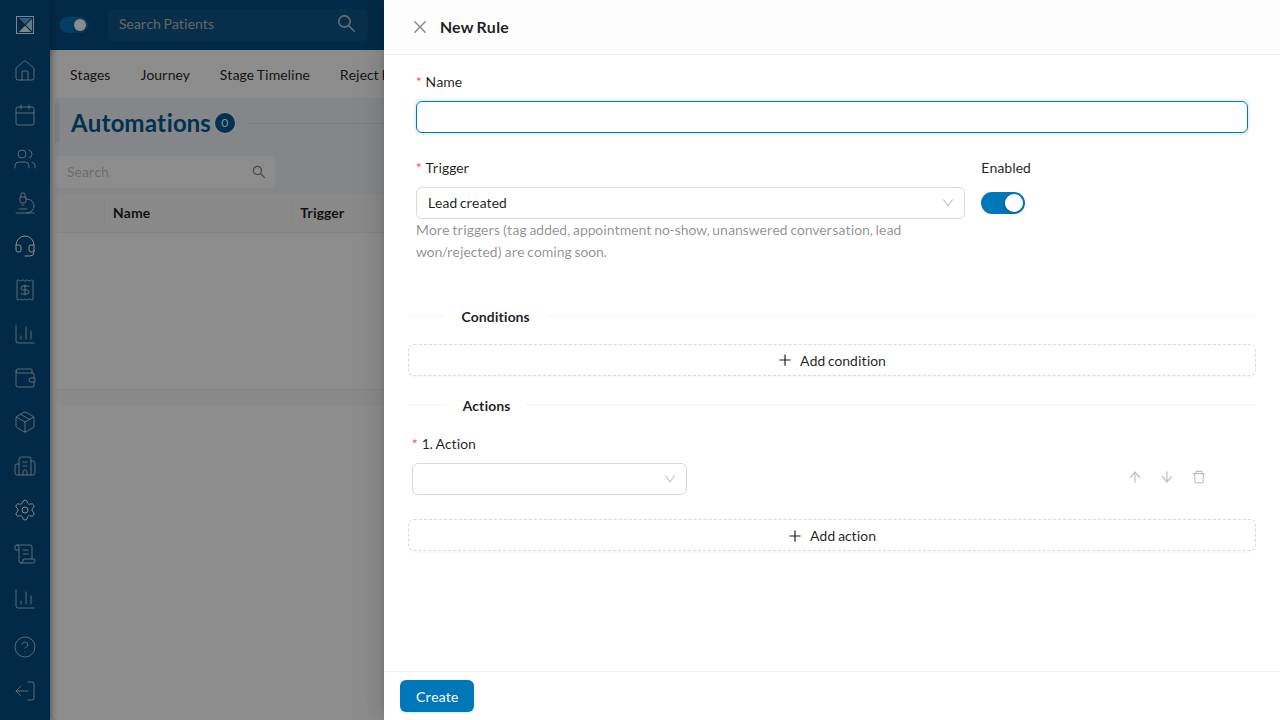
Available today vs coming soon. In this beta, the builder exposes the Lead created, Stage changed, and Stale in stage triggers. Five more triggers exist in the data model — tag added, appointment no-show, unanswered conversation, lead won, lead rejected — but they aren't emitted yet, so the UI deliberately hides them and shows a "coming soon" hint. See Scope, Gaps & Honest Notes.
Why it won't spam or loop
Two safety properties are built in:
- Fires once per event. A rule runs at most once for any given triggering event, even if
the underlying webhook is redelivered or the rule engine retries. A lead can't be assigned five times because Meta sent the same lead five times.
- Won't cascade forever. An action that itself triggers another rule (e.g. a
"move-stage" action firing a "stage-changed" rule) is depth-capped, so automations can't chain into an infinite loop.
Technical view
Data model
AutomationRule(schema.prisma:9177): atrigger(AutomationTrigger) plus JSON
triggerConfig, conditions, and actions (documented shapes at :9184), an order, an enabled flag, and a denormalized runsCount. @@unique([companyId, name]).
AutomationRun(:9208): the execution audit log. The key line is
@@unique([ruleId, dedupeKey]) (:9224) — the database-level guarantee that each (rule, event) fires at most once. Carries status (AutomationRunStatus {PENDING, RUNNING, SUCCESS, FAILED, SKIPPED}), result Json?, and an optional lead.
The eight trigger values are enumerated at enums.graphql:1582; only three are wired to emitters.
Producer / executor split
This repo is the producer; the executor that actually runs the actions lives in a separate gateway service. emitAutomationEvent(...) (packages/server/src/utils/automationEvents.js:23) pushes a job to the BullMQ automation-execute queue and is fire-and-forget: enqueue errors are logged and swallowed (:37) so a failed enqueue never fails the user's mutation. The job payload seeds depth: 0 (:28); the jobId is ` ${trigger}~${id}~0 (:30). The ~0 suffix and depth` field are the depth-cap mechanism the executor increments on each action→trigger hop to stop cascades.
Where triggers are emitted
LEAD_CREATED— every lead-creation path:addNewLead.js:186,moveLead.js:100
(patient→pipeline promotion), handleParseLeads.js:218 (bulk import), addNewLeadFromQr.js:153, and the gateway's lead-capture.service.ts (ad/social capture). eventId = leadId, so it's idempotent per lead.
STAGE_CHANGED—moveLead.js:273, withcontext: { fromStageId, toStageId }.STALE_IN_STAGE— emitted bycronJobs/crm/automationStaleCron.js(every 15 min,
cronJobs.js:189). It loads enabled stale rules, finds leads whose stagedAt <= now − staleDays (take 500), and emits eventId = ${rule.id}:${lead.id}:${lead.stagedAt.getTime()} (:38). Because the stage-entry timestamp (not the current date) anchors the id, the executor's (rule, event) dedupe fires the rule exactly once per stage entry — it re-fires only if the lead leaves and re-enters the stage.
The builder
- Triggers exposed by the UI (
automationHelpers.js:7):LEAD_CREATED,STAGE_CHANGED,
STALE_IN_STAGE. STAGE_CHANGED adds a target stage; STALE_IN_STAGE adds a stale stage + staleDays (1–365). The five unemitted triggers are constants at automationHelpers.js:4 and intentionally omitted, with a notEmittedYet hint shown under the trigger select.
- Conditions (max 10): field ∈
source, platform, stageId, referralSourceId; operator ∈
EQUALS, IN.
- Actions (min 1, max 10):
ASSIGN_USER, MOVE_STAGE, ADD_TAG, SEND_WA_TEMPLATE; the WA
template action takes templateName + language.
- Mobile (
NewAutomationScreen.js) and web (AutomationRuleForm.js) share the same
constants; the web form additionally supports reordering actions (move up/down), which mobile lacks.
Validation & permissions
The four automation mutations (addNewAutomationRule / edit / delete / toggle, schema.graphql:1464) require EDIT_LEAD_SETTINGS (permissions.js:4378) and the FEATURE_CRM_AUTOMATION flag. automationRuleInput (inputRules.js:3194) validates the name (1–120), the trigger against the 8 allowed values, and the size-capped JSON of triggerConfig/conditions/actions.