Social & Ad Integrations
Business view
Before a clinic can capture a single ad lead, it has to connect its marketing accounts to Dentolize. This module is that front door. From the web app, a clinic owner links their Meta (Facebook + Instagram), and — once each platform's app review clears — TikTok, Snapchat, and Google accounts. Connecting does three things:
- Proves the clinic owns the account (via the platform's own login/OAuth screen —
the clinic never types a password into Dentolize).
- Discovers the assets behind that account: which Facebook Pages, which Instagram
accounts, which lead forms, and which ad accounts belong to the clinic.
- Subscribes to live updates so that when someone fills in a lead form or sends a
message, the platform pushes it straight to Dentolize.
Each discovered asset can be individually switched on or off, and mapped to a pipeline stage and branch — so leads from the "Riyadh Whitening" form land in the right list, assigned to the right clinic location, automatically.
Connecting happens on the web only, on purpose. The mobile app lets staff view connection health, refresh the asset list, disconnect, and edit asset mappings — but the actual "log in with Facebook" step is web-only. In the beta sandbox, only Meta is connectable; TikTok, Snapchat, and Google buttons are present but disabled until their platform apps are approved (see Scope, Gaps & Honest Notes).
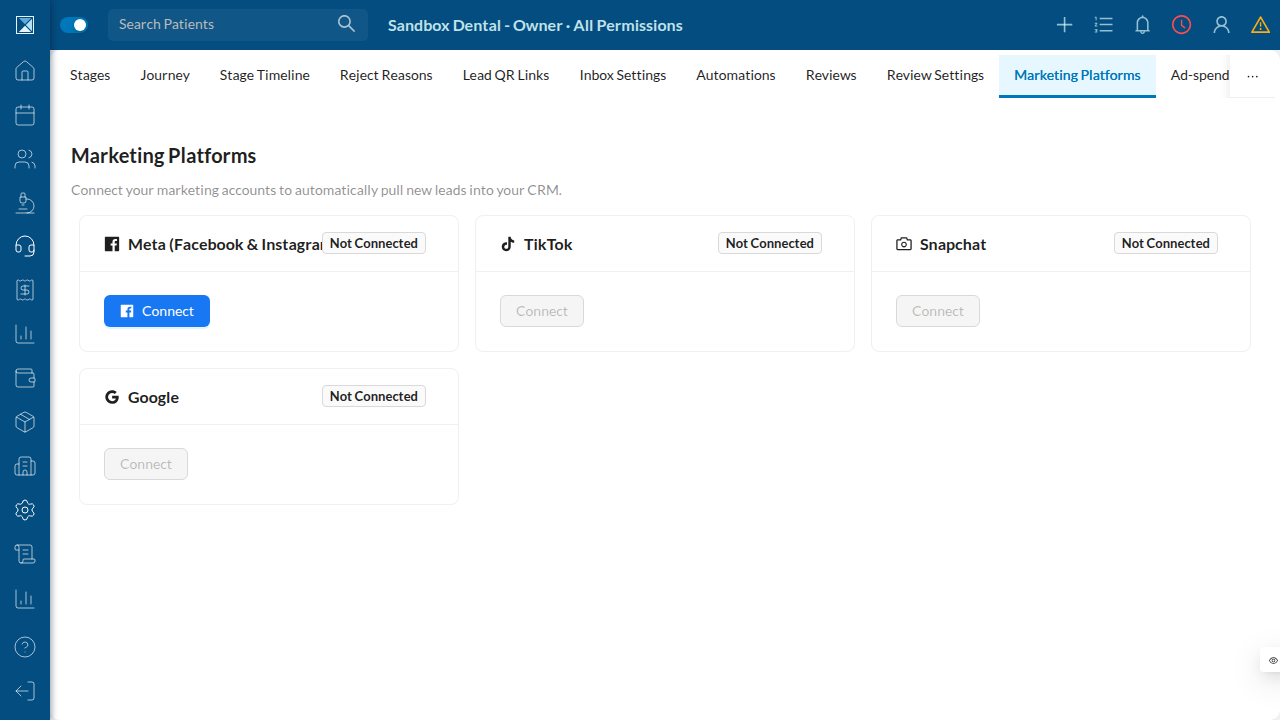
The two connection styles
- Meta uses an in-page popup (Facebook's JS SDK). The clinic clicks Connect,
approves in the Facebook popup, and control returns to Dentolize with an authorization code that is exchanged for a long-lived token.
- TikTok / Snapchat / Google use a redirect: the browser goes to the platform's
consent screen and returns with a code in the URL.
- Google is special — it also offers a no-OAuth path for lead forms: Dentolize
generates a secret webhook URL the clinic pastes into Google, so lead-form capture works even before Google's Ads/Business APIs are approved.
What survives a reconnect
Asset mappings are sticky. If a token expires and the clinic reconnects, their stage/branch mappings and enable/disable choices are preserved — the system upserts assets and never deletes them. This is the difference between "reconnect and keep working" and "reconnect and rebuild everything."
Technical view
Data model
Two Prisma models anchor integrations (packages/prisma/schema.prisma):
SocialIntegration(schema.prisma:8958) — one row per(companyId, platform)
(@@unique, :8981). Holds the encrypted accessToken / refreshToken + tokenExpiresAt (:8964), a webhookKey for push-only integrations (:8969), plus scopes[], externalUserId, businessId, lastError, lastSyncedAt. Indexed on [status, tokenExpiresAt] for token-refresh sweeps.
ConnectedAsset(schema.prisma:8991) — the platform-side objects (Page, IG
account, ad account, lead form, GBP location, WABA). externalId is "the multi-tenant webhook routing key" (:8988): inbound events carry only platform ids and resolve back to a tenant through this table. Self-referential parent/child (:9001) links an IG account under its Page. Per-asset assetToken (:9004) is also encrypted. Toggles enabled / syncLeads (:9005) and optional leadStage / branch mapping. Routing index [platform, type, externalId] (:9020).
Enums (schema.prisma:8877+): SocialPlatform {META, TIKTOK, SNAPCHAT, GOOGLE}, SocialIntegrationStatus {ACTIVE, EXPIRED, REVOKED, ERROR}, ConnectedAssetType {FB_PAGE, IG_ACCOUNT, AD_ACCOUNT, LEAD_FORM, GBP_LOCATION, WABA}.
Meta OAuth connect
Resolver connectSocialIntegration.js (mutation connectSocialIntegration(platform, code, redirectUri), schema.graphql:1454):
- Per-platform feature-flag gate up front — a
SocialPlatform → FEATURE_CRM_INTEGRATIONS_*
map (connectSocialIntegration.js:19).
- Meta path (
:69):exchangeCodeForToken→exchangeForLongLivedToken
(metaGraph.js:12, :24), best-effort scope introspection via debug_token (metaGraph.js:36), getMe (:51).
- Upserts the integration with
accessToken: sealSocialToken(userToken)— **tokens are
stored encrypted and never selected into any GraphQL response** (SAFE_SELECT omits token fields, connectSocialIntegration.js:26).
- Calls
discoverMetaAssets(...)(:112), then re-reads throughSAFE_SELECT.
metaGraph.js centralizes the Graph API surface, and critically reads its base URL from process.env.META_GRAPH_URL || 'https://graph.facebook.com' (metaGraph.js:9) — the hook that lets QA point the whole flow at packages/platform-mock instead of real Facebook. In production META_GRAPH_URL is left unset.
Asset discovery
discoverMetaAssets.js (:40) walks pages (/me/accounts, which also returns the linked instagram_business_account), upserts each FB_PAGE (sealing the page token), adds the IG_ACCOUNT child, subscribes each page to the leadgen webhook (metaGraph.js:83; non-fatal if it fails), upserts each LEAD_FORM (/{page}/leadgen_forms), then upserts AD_ACCOUNTs (/me/adaccounts). The upsert key is companyId_platform_type_externalId, and the function never deletes assets (discoverMetaAssets.js:34) — this is what makes mappings survive reconnects.
Google's no-OAuth lead path
enableGoogleLeadForms.js generates a webhookKey (randomBytes(24).base64url) and returns a paste-in URL ${WEBHOOKS_PUBLIC_URL}/webhooks/google/lead-form/{integrationId} (:27). Google posts lead forms to that URL with the key as a shared secret — no Google API approval required.
Managing integrations (mobile)
IntegrationsScreen.jsis view/manage-only and shows aintegrations.connectOnWeb
hint (:28); inactive platforms show integrations.reconnectOnWeb (IntegrationScreen.js:124).
IntegrationScreen.jssurfaces status,tokenExpiresAt(red if past,:92),
lastSyncedAt, connectedBy, and a lastError box. Active integrations get Refresh assets and Disconnect (with confirm).
EditConnectedAssetScreen.jseditsenabled,syncLeads(shown only for
LEAD_FORM / FB_PAGE), leadStage, and branch.
- On web,
MarketingIntegrations.jsis the real OAuth surface:MetaConnectButton.js
drives the FB JS SDK popup; PlatformConnectButton.js drives redirect OAuth for the others (disabled with a "credentials missing" tooltip when a platform's client id is not configured for the environment).
Permissions
Connect / disconnect / refresh / edit-asset / enable-google-lead-forms all require EDIT_CRM_INTEGRATIONS (permissions.js:4382), on top of isAuthenticated and hasLeadsAccess. Input shapes are validated by connectSocialIntegrationInput (inputRules.js:3176) and editConnectedAssetInput (:3230).